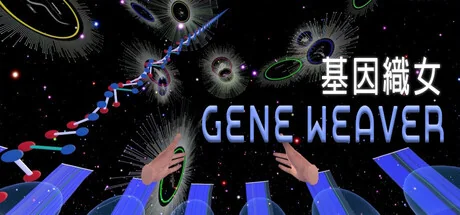
基因織女 Gene Weaver
TZUNING WU
Enter the smallest scale. Re-weave life’s narrative at a molecular level. Freely explore the genetic universe for superpower genes. Create your own magic carpet!
System Requirements
Minimum Requirements
Recommended Requirements
About This Game
Gene Weaver is an open world VR game created by Wu Tzu-ning, commissioned by the National Taiwan Science Education Center. It was showcased in the Gene Weaving Lab gallery as part of the 'School of the end of the world' exhibition. Best experience is enjoyed with HTC VIVE Pro.
Welcome to the Gene Weaver universe! Look in the mirror to your left; you’re on a cosmic shuttle. Navigate through the universe of gene weaving, collect specialty gene maps and life flowers to craft your personal genetic magic carpet. Grip the colorful yarn spool with your left hand and pull the trigger to launch and control flight. Grip again to place the spool down. If released mid-flight, the spool will fall to the ground. Keep your right hand free. When the laser beam appears, pull the right trigger to select and confirm your weave. The gene patterns you collect will be displayed in the plaza’s crystal ball. After collecting all materials, return to the loom, swap the colorful yarn spool for the silver shuttle, and head to the design area behind the loom to customize your specialty magic carpet. Once you’ve finished designing, press the green “Save Carpet” button on the left. After saving, head to the Gene Weaver statue on the right and grab a marker to sign on the whiteboard. Press the green “Photo” button to take a picture with your carpet design and the Gene Weaver statue. This completes your gene weaving experience.
Share Your Experience
Help other gamers! Share how this game runs on your setup, share tips, or ask questions.
Related Games
Discover similar games you might enjoy based on genre and creator.

Legal Disclaimer
The game information, images, descriptions, and system requirements displayed on this page are sourced from third-party platforms and are not owned by Can I Run It. We are not affiliated with, endorsed by, or connected to the game developers, publishers, or distributors.
Can I Run It is a system compatibility checking service that helps users determine if their hardware can run specific games. We do not sell, distribute, or host any game content.
All trademarks, registered trademarks, product names, and company names or logos mentioned herein are the property of their respective owners.
If you believe any content displayed violates your intellectual property rights, please contact us at [email protected] with relevant details, and we will promptly address your concerns.