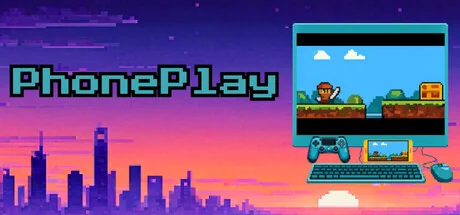
PhonePlay
SDShepard
Play any Android game on PC with a controller, mouse, and keyboard. No emulator. No phone app. One permission. Connect by USB, drop buttons onto a screenshot of your phone, save a profile, and play. Setup in under 60 seconds.
System Requirements
Exigences minimales
Exigences recommandées
About This Game
Why this exists
I wanted to play mobile games with a controller. Every existing solution required a phone-side app with accessibility permissions, overlay access, or monthly subscriptions. You had to hand over the keys to your phone to software you don't control.
PhonePlay runs entirely on your PC. Nothing is installed on your phone. Only one permission is granted to send video/audio to your computer, and input back to the phone. Your game runs on real Android hardware over a USB cable. The phone doesn't even know the difference.
How it works
1. Connect your phone via USB.
2. Launch PhonePlay. A screenshot of your phone appears.
3. Drag button mappings onto the game UI.
4. Save a profile. Play.
Setup takes under 60 seconds.
What you get
Full gamepad support. All buttons, D-pad, analog sticks, triggers, thumbstick click.
Three stick modes. Absolute joystick, slide-style, or virtual-joystick drag. Covers shooters, MOBAs, and action games.
Mouse and keyboard. Bind any key or mouse button to a screen position. Mouse aim for shooters with adjustable sensitivity and an alt-speed modifier for scoped play.
Per-button modes. Tap, hold, or rapid fire. One click to cycle.
Tunable deadzones, Y-axis scaling, drag speed. Dial in exactly how the sticks feel.
Portable profiles. Coordinates are normalized, so profiles work across phone models. Share a config with anyone.
No emulator. Real hardware.
Your game runs natively on your actual phone hardware. There's no emulator signature, no modified APK, no injected code on the device. PhonePlay sends touch events over USB, the same way Android's own developer tools work.
Stress-tested 72 hours in live ranked play with no bans to date. However, we cannot guarantee you won't be banned. Always check the terms of service for your game before using PhonePlay.
No phone app. One permission. No subscription.
PhonePlay doesn't install anything on your phone. It doesn't request accessibility access, overlay permissions, or storage access. It doesn't run a background service. The only thing you need to enable is USB debugging, a built-in Android developer setting that lets your PC communicate with your phone over the cable. It only works while plugged in, only from a PC you explicitly trust, and you can turn it off anytime.
Compare that to phone-side apps that want always-on accessibility services, screen overlay access, and charge you monthly on top of it.
You pay once. You own it.
Works great with
Monster Hunter Outlanders. No native controller support? Now it has full gamepad. Build your own keyboard and mouse layout as well if you prefer that.
COD Mobile. Mouse aim on real hardware, no emulator lobby.
Any Android game. If it runs on your phone, PhonePlay can map it.
Profile sharing
Export your button layout as a single file. Import someone else's. Drop your profiles in the community and play what a veteran already dialed in.
Share Your Experience
Help other gamers! Share how this game runs on your setup, share tips, or ask questions.
Please log in to share your experience with the community!
Related Games
Discover similar games you might enjoy based on genre and creator.





Legal Disclaimer
Les informations sur le jeu, les images, les descriptions et la configuration système requise affichées sur cette page proviennent de plateformes tierces et n'appartiennent pas à Can I Run It. Nous ne sommes ni affiliés, ni approuvés, ni liés aux développeurs, éditeurs ou distributeurs du jeu.
Can I Run It est un service de vérification de compatibilité système qui aide les utilisateurs à déterminer si leur matériel peut exécuter des jeux spécifiques. Nous ne vendons, ne distribuons et n'hébergeons aucun contenu de jeu.
Toutes les marques commerciales, marques déposées, noms de produits et noms de sociétés ou logos mentionnés ici sont la propriété de leurs propriétaires respectifs.
Si vous pensez qu'un contenu affiché viole vos droits de propriété intellectuelle, veuillez nous contacter à [email protected] avec les détails pertinents, et nous répondrons rapidement à vos préoccupations.