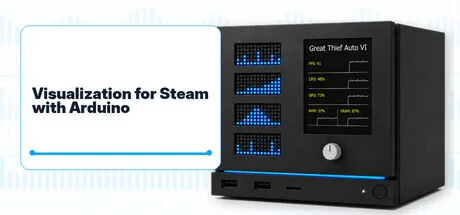
Visualization for Steam with Arduino
Dunaparty
Visualization for Steam with Arduino is a PC software and Arduino firmware package for players who want to build a custom faceplate for their Steam Machine or Steam gaming PC. External hardware required.
Configuration requise
Exigences minimales
Exigences recommandées
À propos de ce jeu
Give your gaming setup a face of its own
Build a custom faceplate that brings your Steam games and system stats onto a physical display. Visualization for Steam with Arduino combines a PC companion app and Arduino firmware for your Steam Machine or Steam gaming PC.
External hardware required. This purchase includes software and firmware only; no physical components or games are included.
Your game at a glance
- See your active Steam user and currently running game.
- Show game cover art and player and global achievement information where available.
- Monitor FPS and CPU, GPU, RAM, and VRAM usage while you play.
- Browse display pages with an Arduino Modulino Knob, Buttons, or Joystick.
Available metrics and achievement data depend on the game, system, drivers, and Steam data.
Connect, customize, play
The app detects a supported Arduino board and installs the matching firmware when needed. A single USB cable powers the board and carries firmware and display data. The companion app runs quietly in the background and can be minimized to the system tray.
Build with off-the-shelf modules and solder-free Qwiic connections. Create your own faceplate, enclosure, and mounting layout, with reusable components and no battery required.
What you need
- Full display setup: Arduino UNO R4 Minima or UNO R4 WiFi, Adafruit 2.8-inch TFT Display Shield V2, four Arduino Modulino LED Matrix modules, and at least one Modulino Knob, Buttons, or Joystick.
- Matrix-only setup: Arduino UNO R4 WiFi and four Modulino LED Matrix modules, without a TFT display or input module.
- USB and suitable Qwiic cables, plus your own faceplate or mounting solution. Allow room for the electronics and preserve your PC's airflow.
- Windows or Linux, including SteamOS, with the Steam client running and the board accessible as a USB serial device.
The official website (follow the link on the right panel) provides more product details, along with installation and configuration instructions to help you get started. Its gallery offers a closer look at the display and custom builds, while the changelog documents updates and improvements.
Trademarks and copyright
This is an independent companion utility and firmware package for hobbyist faceplate projects. It is not made by, endorsed by, sponsored by, or affiliated with Valve, Arduino, or Adafruit. Steam, Steam Machine, SteamOS, Arduino, Modulino, and Adafruit names are used only to identify compatibility with the relevant software, boards, and accessories.
Valve, the Valve logo, Steam, the Steam logo, Steam Machine, and SteamOS are trademarks and/or registered trademarks of Valve Corporation.
Arduino, the Arduino logo, and Modulino are trademarks or registered trademarks of Arduino S.r.l.
Adafruit is a trademark or registered trademark of Adafruit companies.
All other trademarks are the property of their respective owners.
Application software, Arduino firmware, store assets, and trailer video content are copyright (c) 2026 Dunaparty. All rights reserved, except where separate third-party licenses apply.
Trailer music credit:
Punch by Alex-Productions.
Music promoted by Chosic.
Creative Commons Attribution 3.0 Unported (CC BY 3.0).
"Partagez votre expérience de jeu"
Help other gamers! Share how this game runs on your setup, share tips, or ask questions.
Please log in to share your experience with the community!
Jeux les mieux notés
Discover similar games you might enjoy based on genre and creator.



Avis Légal
Les informations sur le jeu, les images, les descriptions et la configuration système requise affichées sur cette page proviennent de plateformes tierces et n'appartiennent pas à Can I Run It. Nous ne sommes ni affiliés, ni approuvés, ni liés aux développeurs, éditeurs ou distributeurs du jeu.
Can I Run It est un service de vérification de compatibilité système qui aide les utilisateurs à déterminer si leur matériel peut exécuter des jeux spécifiques. Nous ne vendons, ne distribuons et n'hébergeons aucun contenu de jeu.
Toutes les marques commerciales, marques déposées, noms de produits et noms de sociétés ou logos mentionnés ici sont la propriété de leurs propriétaires respectifs.
Si vous pensez qu'un contenu affiché viole vos droits de propriété intellectuelle, veuillez nous contacter à [email protected] avec les détails pertinents, et nous répondrons rapidement à vos préoccupations.