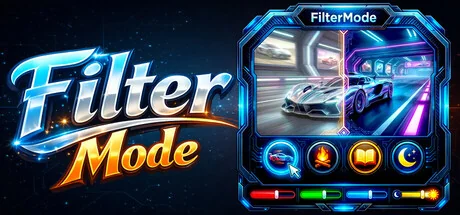
Filter Mode: Color Booster | Live Wallpaper | Eye Protection & Color Blindness
istenen
The most comprehensive tool for display customization! Switch between modes like Gaming, Reading, and Night with a single click. Easily manage Colors and Brightness. Assign timers or hotkeys to your profiles. Transform your Images and Videos into screen filters or live wallpapers.
System Requirements
Minimum Requirements
Recommended Requirements
About This Game
A powerful and easy-to-use tool to personalize your visual experience.
• 🚀🖱️ Change atmosphere during gaming or work!
• 👁️ Adjust color and brightness as you wish to protect your eyes!
• 🖼️ Use your JPG/PNG images as screen filters!
• 🎥 Use your MP4/WEBM/AVI/MKV/MOV videos as screen filters!
🎨 Color Filters:
Real-time RGB, saturation, brightness adjustment
0-100% transparency control
Save your filters to a list
Easily apply / rename / delete your saved filters
🖼️ Image Filters:
Add JPG/PNG images via drag-and-drop
Image transparency adjustment
Save your images to a list
Easily apply / change opacity / delete your saved images
🎥 Video Filters:
Add MP4/WEBM/AVI/MKV/MOV videos via drag-and-drop
Video transparency adjustment
Save your videos to a list
Easily apply / change opacity / delete your saved videos
🕒 Scheduler System
With the Scheduler tab, you can set a specific time to automatically:
Toggle the All FilterMode filters on/off
Automatically load a saved profile
Shutdown PC
Restart PC
Lock PC
💾 Advanced Profile Management
You can now save every setting (Color, Image, Video, Gamma, and System Brightness) as a named Profile.000
Saved profiles are now listed with visual icons (Color previews or thumbnails).
Switch between "Game Mode," "Reading Mode," or "Night Mode"... (your profiles) with a single click.
💾 Automatic Save Management:
All settings are automatically saved
Last used filters and overlays are remembered and automatically set at startup
Your settings are safe even in unexpected shutdowns
⚡ Performance
Optimized Efficiency:Designed for low resource consumption.
⌨️ Quick Actions:
Instant control via customizable global shortcuts (Shift+Esc, F-keys)
Automatic system language detection (30+ languages).
Share Your Experience
Help other gamers! Share how this game runs on your setup, share tips, or ask questions.
Related Games
Discover similar games you might enjoy based on genre and creator.





Legal Disclaimer
The game information, images, descriptions, and system requirements displayed on this page are sourced from third-party platforms and are not owned by Can I Run It. We are not affiliated with, endorsed by, or connected to the game developers, publishers, or distributors.
Can I Run It is a system compatibility checking service that helps users determine if their hardware can run specific games. We do not sell, distribute, or host any game content.
All trademarks, registered trademarks, product names, and company names or logos mentioned herein are the property of their respective owners.
If you believe any content displayed violates your intellectual property rights, please contact us at [email protected] with relevant details, and we will promptly address your concerns.