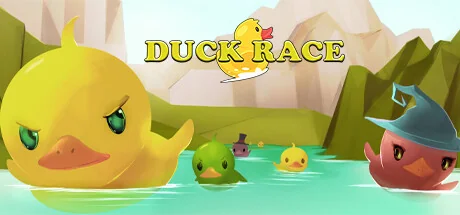
Duck Race
Ibzy Studios
Duck Race is a cute Twitch integrated racing game. Players can join the race with the chat command !quack and customise their rubber duck with a variety of hats and accessories.
System Requirements
Minimum Requirements
Recommended Requirements
About This Game
IMPORTANT: A live Twitch stream is required to play Duck Race.

Duck Race is the latest in Twitch viewer interaction!
Invite your viewers to enter the race as an adorable rubber duck, and kit them out with a variety of skins and accessories. Let them loose across a number of rivers and environments, and cheer as they race to be the first over the waterfall!
Key Features
- Full Twitch.tv chat integration
- !quack to join the race
- Customise with a number of skins to choose from
- Add additional flare with over 25 hats and accessories
- Custom Duck names - escape the restrictions of username326
Early Response
"“Duck Race is super-cute. My viewers love their tiny rubber ducks in funny hats, and I love how fun they look when they go over a waterfall.” - John Robertson + The Dark Room)
"Duckrace is one of the best and easiest community, chill games out there.
Rubber duck racing?
HECK YEAH" - MEOwTiNgZ
"Let's just say Duck Race moved me... TO A BIGGER HOUSE!
(Oops, I said the quiet part loud and the loud part quiet.)
No but seriously, Duck Race is super fun and really easy to explain to new viewers, instant conversational starter." - THRILLHOO
Controls
Mostly intuitive controls, but with a little nuance:
- Click ducks on the home screen to set player skin options
- Click left mouse to take/release control of the camera
- Mouse to turn camera
- WASD to move camera - Shift speeds you up
- Numbers 1-9 for set camera locations
- Space to move UP, Left Ctrl to move DOWN
- M to mute music
- +/- to increase/decrease camera movement speed
- Q to show/hide names
Share Your Experience
Help other gamers! Share how this game runs on your setup, share tips, or ask questions.
Related Games
Discover similar games you might enjoy based on genre and creator.


Legal Disclaimer
The game information, images, descriptions, and system requirements displayed on this page are sourced from third-party platforms and are not owned by Can I Run It. We are not affiliated with, endorsed by, or connected to the game developers, publishers, or distributors.
Can I Run It is a system compatibility checking service that helps users determine if their hardware can run specific games. We do not sell, distribute, or host any game content.
All trademarks, registered trademarks, product names, and company names or logos mentioned herein are the property of their respective owners.
If you believe any content displayed violates your intellectual property rights, please contact us at [email protected] with relevant details, and we will promptly address your concerns.