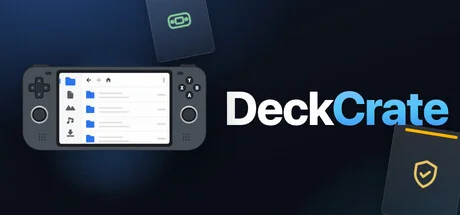
DeckCrate
HFMA
A fast, privacy-focused file manager built for your Steam Deck and handheld. Drive it entirely with a controller — D-pad to move, A to open, B to go back — or use mouse and keyboard. Copy, move, batch-rename, compress, preview, and mount images. Zero telemetry, ever.
System Requirements
Minimum Requirements
Recommended Requirements
About This Game
DeckCrate
A real file manager you can drive entirely with a game controller.* Built for the Steam Deck, ROG Ally, Legion Go — and the couch. Mouse and keyboard work exactly as well.
Navigate with your controller's D-pad, enter folders with A, go back with B. Hold LT for file operations, RT for selection, and press Start for a command menu with every action. Every single feature is reachable from a controller — no touchpad-poking required.
Real file operations
Copy, move, rename, and delete — recursive, with collision-safe naming
Pause, resume & retry — pause any operation mid-file, and recover a batch if one item fails
Undo / redo file operations — copy, move, rename, trash, compress, and more
Batch rename — number a whole selection or find-and-replace across names, with live preview
Trash that respects your OS (freedesktop, macOS Trash, Windows Recycle Bin)
Drag and drop within the app and across other apps
A built-in toolbox
Preview pane — text and code, images, SVG, HTML, Markdown, and PDF, right beside the file list
Compress & extract — ZIP, TAR family, plus 7z and RAR extraction, including password-protected archives
Mount disk images — ISO, IMG, DMG, and more, straight from the file list
Embedded terminal — a real shell at the current folder
Disk usage maps and folder item counts
Recursive search across a folder and all its sub-folders
Git-aware — see your branch and per-file status badges in any repo
Tabs, bookmarks, and a Recent list — all persisted across launches
Privacy-respecting by design
Zero telemetry. No analytics, no crash reporting, no phone-home — not even for technical reasons, and no telemetry SDK is bundled. Everything it remembers stays on your machine. The only network activity is what you start yourself.
Made for everyone
A fully localized interface in 36 languages, including full right-to-left support. It follows your system language and is switchable in-app at any time.
Cross-platform
Windows, macOS, and Linux / SteamOS. Each platform uses its own native trash, drives, and mounts. Fast, modern, and controller-first from the ground up.
* Every feature is fully navigable with a gamepad on any device. Only text entry needs a keyboard: the built-in virtual keyboard on Steam Deck, Steam Machine and other SteamOS devices, or your physical keyboard on PCs and laptops, where Steam's virtual keyboard isn't available.
Share Your Experience
Help other gamers! Share how this game runs on your setup, share tips, or ask questions.
Related Games
Discover similar games you might enjoy based on genre and creator.



Legal Disclaimer
The game information, images, descriptions, and system requirements displayed on this page are sourced from third-party platforms and are not owned by Can I Run It. We are not affiliated with, endorsed by, or connected to the game developers, publishers, or distributors.
Can I Run It is a system compatibility checking service that helps users determine if their hardware can run specific games. We do not sell, distribute, or host any game content.
All trademarks, registered trademarks, product names, and company names or logos mentioned herein are the property of their respective owners.
If you believe any content displayed violates your intellectual property rights, please contact us at [email protected] with relevant details, and we will promptly address your concerns.