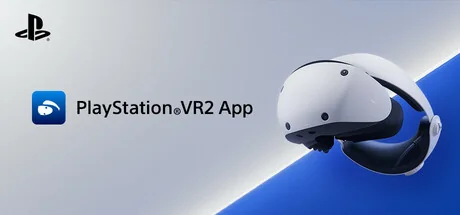
PlayStation®VR2 App
Sony Interactive Entertainment
Enjoy VR games and apps on Steam with PlayStation VR2! Install PS VR2 App to use PS VR2 on your PC, set up your PS VR devices, and keep the firmware for PS VR2 headset and PS VR2 Sense controllers up to date.
Системные требования
Минимальные требования
Рекомендуемые требования
Об этой игре
- Play VR games and apps on Steam using your PlayStation VR2 VR headset and PlayStation VR2 Sense controllers.
- Set up your PlayStation VR2 on your PC.
- Update the firmware for your PlayStation VR2 VR headset and PlayStation VR2 Sense controllers.
- Adjust settings for your PlayStation VR2 from the SteamVR dashboard, including setting your play area and screen brightness.
You'll need the following to get started with PlayStation VR2 App:
- PlayStation VR2 VR headset
- PlayStation VR2 Sense controllers
- PlayStation VR2 PC adapter
- DisplayPort™1.4 cable (sold separately)
- Bluetooth® adapter (sold separately, required only if your PC doesn't support Bluetooth®)
For details about the required specs for PC, visit the PlayStation VR2 support page, or refer to the "System Requirements" section below.
Using this app
When connecting PlayStation VR2 Sense controllers to a PC, connection or tracking problems may occur depending on the condition of the Bluetooth devices being used or the surrounding environment. In such cases, refer to the PlayStation Support page titled "Bluetooth adapters compatible with PS VR2 on PC" for more information.
To play VR games and apps on Steam with PlayStation VR2, PlayStation VR2 App needs to be installed on your PC. Keep the app installed even after initial setup is complete.
Поделитесь своим игровым опытом
Help other gamers! Share how this game runs on your setup, share tips, or ask questions.
Лучшие игры
Discover similar games you might enjoy based on genre and creator.

Отказ от ответственности
Информация об игре, изображения, описания и системные требования, представленные на этой странице, получены со сторонних платформ и не принадлежат Can I Run It. Мы не связаны с разработчиками, издателями или дистрибьюторами игр, не поддерживаемся ими и не имеем к ним отношения.
Can I Run It — это сервис проверки совместимости системы, который помогает пользователям определить, может ли их оборудование запускать определенные игры. Мы не продаем, не распространяем и не размещаем игровой контент.
Все товарные знаки, зарегистрированные товарные знаки, названия продуктов и названия компаний или логотипы, упомянутые здесь, являются собственностью их соответствующих владельцев.
Если вы считаете, что какой-либо отображаемый контент нарушает ваши права интеллектуальной собственности, свяжитесь с нами по адресу [email protected] с соответствующими подробностями, и мы оперативно рассмотрим ваши вопросы.