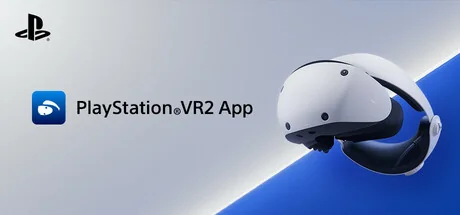
PlayStation®VR2 App
Sony Interactive Entertainment
Enjoy VR games and apps on Steam with PlayStation VR2! Install PS VR2 App to use PS VR2 on your PC, set up your PS VR devices, and keep the firmware for PS VR2 headset and PS VR2 Sense controllers up to date.
Requisiti di sistema
Requisiti minimi
Requisiti raccomandati
Informazioni su questo gioco
- Play VR games and apps on Steam using your PlayStation VR2 VR headset and PlayStation VR2 Sense controllers.
- Set up your PlayStation VR2 on your PC.
- Update the firmware for your PlayStation VR2 VR headset and PlayStation VR2 Sense controllers.
- Adjust settings for your PlayStation VR2 from the SteamVR dashboard, including setting your play area and screen brightness.
You'll need the following to get started with PlayStation VR2 App:
- PlayStation VR2 VR headset
- PlayStation VR2 Sense controllers
- PlayStation VR2 PC adapter
- DisplayPort™1.4 cable (sold separately)
- Bluetooth® adapter (sold separately, required only if your PC doesn't support Bluetooth®)
For details about the required specs for PC, visit the PlayStation VR2 support page, or refer to the "System Requirements" section below.
Using this app
When connecting PlayStation VR2 Sense controllers to a PC, connection or tracking problems may occur depending on the condition of the Bluetooth devices being used or the surrounding environment. In such cases, refer to the PlayStation Support page titled "Bluetooth adapters compatible with PS VR2 on PC" for more information.
To play VR games and apps on Steam with PlayStation VR2, PlayStation VR2 App needs to be installed on your PC. Keep the app installed even after initial setup is complete.
Condividi la tua esperienza di gioco
Help other gamers! Share how this game runs on your setup, share tips, or ask questions.
Giochi più votati
Discover similar games you might enjoy based on genre and creator.



Avvertenza legale
Le informazioni sul gioco, le immagini, le descrizioni e i requisiti di sistema visualizzati su questa pagina provengono da piattaforme di terze parti e non sono di proprietà di Can I Run It. Non siamo affiliati, approvati o collegati agli sviluppatori, editori o distributori del gioco.
Can I Run It è un servizio di verifica della compatibilità di sistema che aiuta gli utenti a determinare se il loro hardware può eseguire giochi specifici. Non vendiamo, distribuiamo o ospitiamo alcun contenuto di gioco.
Tutti i marchi, marchi registrati, nomi di prodotti e nomi o loghi di aziende citati nel presente documento sono di proprietà dei rispettivi titolari.
Se ritieni che qualsiasi contenuto visualizzato violi i tuoi diritti di proprietà intellettuale, ti preghiamo di contattarci all'indirizzo [email protected] con dettagli pertinenti e risolveremo prontamente i vostri problemi.