Duck Race
Ibzy Studios
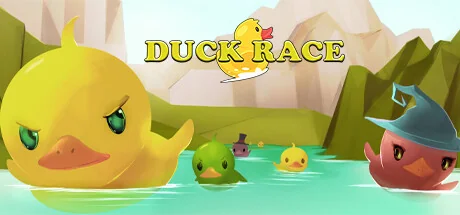
Duck Race is a cute Twitch integrated racing game. Players can join the race with the chat command !quack and customise their rubber duck with a variety of hats and accessories.
Requisiti di sistema
Requisiti minimi
Requisiti raccomandati
Informazioni su questo gioco
IMPORTANT: A live Twitch stream is required to play Duck Race.
Duck Race is the latest in Twitch viewer interaction!
Invite your viewers to enter the race as an adorable rubber duck, and kit them out with a variety of skins and accessories. Let them loose across a number of rivers and environments, and cheer as they race to be the first over the waterfall!
Key Features
- Full Twitch.tv chat integration
- !quack to join the race
- Customise with a number of skins to choose from
- Add additional flare with over 25 hats and accessories
- Custom Duck names - escape the restrictions of username326
Early Response
"“Duck Race is super-cute. My viewers love their tiny rubber ducks in funny hats, and I love how fun they look when they go over a waterfall.” - John Robertson + The Dark Room)
"Duckrace is one of the best and easiest community, chill games out there.
Rubber duck racing?
HECK YEAH" - MEOwTiNgZ
"Let's just say Duck Race moved me... TO A BIGGER HOUSE!
(Oops, I said the quiet part loud and the loud part quiet.)
No but seriously, Duck Race is super fun and really easy to explain to new viewers, instant conversational starter." - THRILLHOO
Controls
Mostly intuitive controls, but with a little nuance:
- Click ducks on the home screen to set player skin options
- Click left mouse to take/release control of the camera
- Mouse to turn camera
- WASD to move camera - Shift speeds you up
- Numbers 1-9 for set camera locations
- Space to move UP, Left Ctrl to move DOWN
- M to mute music
- +/- to increase/decrease camera movement speed
- Q to show/hide names
Condividi la tua esperienza di gioco
Help other gamers! Share how this game runs on your setup, share tips, or ask questions.
Giochi più votati
Discover similar games you might enjoy based on genre and creator.


Avvertenza legale
Le informazioni sul gioco, le immagini, le descrizioni e i requisiti di sistema visualizzati su questa pagina provengono da piattaforme di terze parti e non sono di proprietà di Can I Run It. Non siamo affiliati, approvati o collegati agli sviluppatori, editori o distributori del gioco.
Can I Run It è un servizio di verifica della compatibilità di sistema che aiuta gli utenti a determinare se il loro hardware può eseguire giochi specifici. Non vendiamo, distribuiamo o ospitiamo alcun contenuto di gioco.
Tutti i marchi, marchi registrati, nomi di prodotti e nomi o loghi di aziende citati nel presente documento sono di proprietà dei rispettivi titolari.
Se ritieni che qualsiasi contenuto visualizzato violi i tuoi diritti di proprietà intellettuale, ti preghiamo di contattarci all'indirizzo [email protected] con dettagli pertinenti e risolveremo prontamente i vostri problemi.