Duck Race
Ibzy Studios
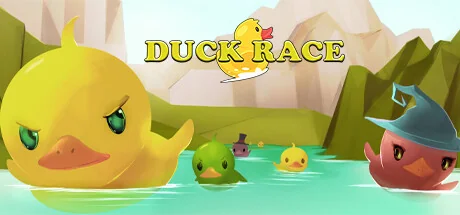
Duck Race is a cute Twitch integrated racing game. Players can join the race with the chat command !quack and customise their rubber duck with a variety of hats and accessories.
Configuration requise
Exigences minimales
Exigences recommandées
À propos de ce jeu
IMPORTANT: A live Twitch stream is required to play Duck Race.
Duck Race is the latest in Twitch viewer interaction!
Invite your viewers to enter the race as an adorable rubber duck, and kit them out with a variety of skins and accessories. Let them loose across a number of rivers and environments, and cheer as they race to be the first over the waterfall!
Key Features
- Full Twitch.tv chat integration
- !quack to join the race
- Customise with a number of skins to choose from
- Add additional flare with over 25 hats and accessories
- Custom Duck names - escape the restrictions of username326
Early Response
"“Duck Race is super-cute. My viewers love their tiny rubber ducks in funny hats, and I love how fun they look when they go over a waterfall.” - John Robertson + The Dark Room)
"Duckrace is one of the best and easiest community, chill games out there.
Rubber duck racing?
HECK YEAH" - MEOwTiNgZ
"Let's just say Duck Race moved me... TO A BIGGER HOUSE!
(Oops, I said the quiet part loud and the loud part quiet.)
No but seriously, Duck Race is super fun and really easy to explain to new viewers, instant conversational starter." - THRILLHOO
Controls
Mostly intuitive controls, but with a little nuance:
- Click ducks on the home screen to set player skin options
- Click left mouse to take/release control of the camera
- Mouse to turn camera
- WASD to move camera - Shift speeds you up
- Numbers 1-9 for set camera locations
- Space to move UP, Left Ctrl to move DOWN
- M to mute music
- +/- to increase/decrease camera movement speed
- Q to show/hide names
"Partagez votre expérience de jeu"
Help other gamers! Share how this game runs on your setup, share tips, or ask questions.
Please log in to share your experience with the community!
Jeux les mieux notés
Discover similar games you might enjoy based on genre and creator.


Avis Légal
Les informations sur le jeu, les images, les descriptions et la configuration système requise affichées sur cette page proviennent de plateformes tierces et n'appartiennent pas à Can I Run It. Nous ne sommes ni affiliés, ni approuvés, ni liés aux développeurs, éditeurs ou distributeurs du jeu.
Can I Run It est un service de vérification de compatibilité système qui aide les utilisateurs à déterminer si leur matériel peut exécuter des jeux spécifiques. Nous ne vendons, ne distribuons et n'hébergeons aucun contenu de jeu.
Toutes les marques commerciales, marques déposées, noms de produits et noms de sociétés ou logos mentionnés ici sont la propriété de leurs propriétaires respectifs.
Si vous pensez qu'un contenu affiché viole vos droits de propriété intellectuelle, veuillez nous contacter à [email protected] avec les détails pertinents, et nous répondrons rapidement à vos préoccupations.