
Base Station Sync
DanFang
Base Station Sync automates HTC Vive 1.0 lighthouses with zero-user effort, syncing power with SteamVR to end manual toggling. It is ultra-lightweight, exiting completely with SteamVR without running idle in the background. Timely sleep cycles reduce motor wear and extend hardware longevity.
Configuration requise
Exigences minimales
Exigences recommandées
À propos de ce jeu
Notice / Important
Important Note 1:
Recommended Startup Order:
Wake / turn on your headset.
Launch SteamVR.
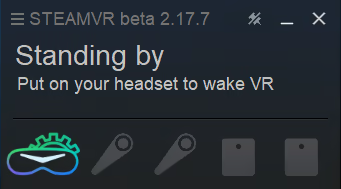
Once the headset is detected in the SteamVR window, Base Station Sync will start automatically and power on the base stations.
(Note: The headset only needs to be powered on, not tracked. If SteamVR does not recognize the headset, the auto-start process cannot be triggered.)
As shown in the SteamVR window below:
Important Note 2:
Note:Once the sleep command is sent via Bluetooth and the app exits, the base stations require about one minute to run down their internal timer before actually going to sleep.
About the Software
🎮 Base Station Sync — Don't let tedious toggling and hardware wear ruin your VR experience
As an HTC Vive 1.0 base station user, are you silently enduring these unresolved pain points?
The Hassle of Manual Toggling: To turn off your base stations, you have to clumsily plug and unplug their power cables before and after every gaming session, or struggle with unstable Bluetooth connections in a mobile app.
Annoying High-Frequency Noise: In the dead of night or when the room is quiet, the base station motors emit a continuous, high-pitched whine that is deeply irritating and ruins your peace of mind.
Base Station Sync is born to solve these issues. It completely ends this tedious routine, bringing your base station management into a truly seamless and fully automated era.
💡 Core Highlights
Fully Automated, Zero-Effort Operation This utility runs fully automatically, perfectly synchronizing with the startup and shutdown states of SteamVR. When SteamVR starts, the software instantly wakes up all 1.0 base stations; when SteamVR closes, it automatically sends a sleep command to let the motors stop rotating immediately, completely freeing your hands.
Ultra-Lightweight, Zero Background Footprint A pure tool designed with "zero persistence, zero interference" in mind. By registering as a SteamVR officially supported overlay application, it achieves flawless synchronization. Once you exit SteamVR, the software automatically closes entirely alongside it. It never hogs background processes, consumes no memory, and eats zero CPU cycles, keeping your system absolutely clean.
Reduced Wear, Significantly Extended Hardware Longevity HTC Vive 1.0 base stations house a high-speed eccentric motor spinning at 3600 RPM. Leaving them powered on continuously causes severe bearing wear, eventually leading to tracking jitter and precision loss. Through precise, timely sleep management, this tool stops the motors immediately when you are not playing, effectively reducing mechanical fatigue and significantly extending your valuable hardware's lifespan.
Instant Sleep, Lower Daily Power Consumption Beyond hardware protection and noise elimination, turning off your base stations promptly yields extra daily benefits. Even when idle, leaving base stations powered on causes continuous power consumption and slight heat dissipation. This utility ensures they are active only when needed and sleep when not, helping you effectively cut off unnecessary daily electricity waste and reduce your utility bills.
⚠️ Critical Hardware Compatibility Statement (Read Before Purchasing)
Please carefully check your hardware environment before purchasing, as this utility has strict hardware requirements:
Only Supports: HTC Vive Base Station 1.0 versions (the traditional gray base stations with a flat vertical front face).
Completely Unsupported: Base Station 2.0 versions (the versions with a curved front face).
Your PC must be equipped with a Bluetooth 4.0 or higher adapter (either internal or external USB dongle) to send Bluetooth commands to the base stations.
SteamVR (Windows 10/11 64-bit) must be installed and running to enable the automation functionality.
⚡ Quick Configuration (First-Time Setup Only)
Launch Base Station Sync in Steam, click "Scan" to automatically discover nearby 1.0 base stations via Bluetooth.
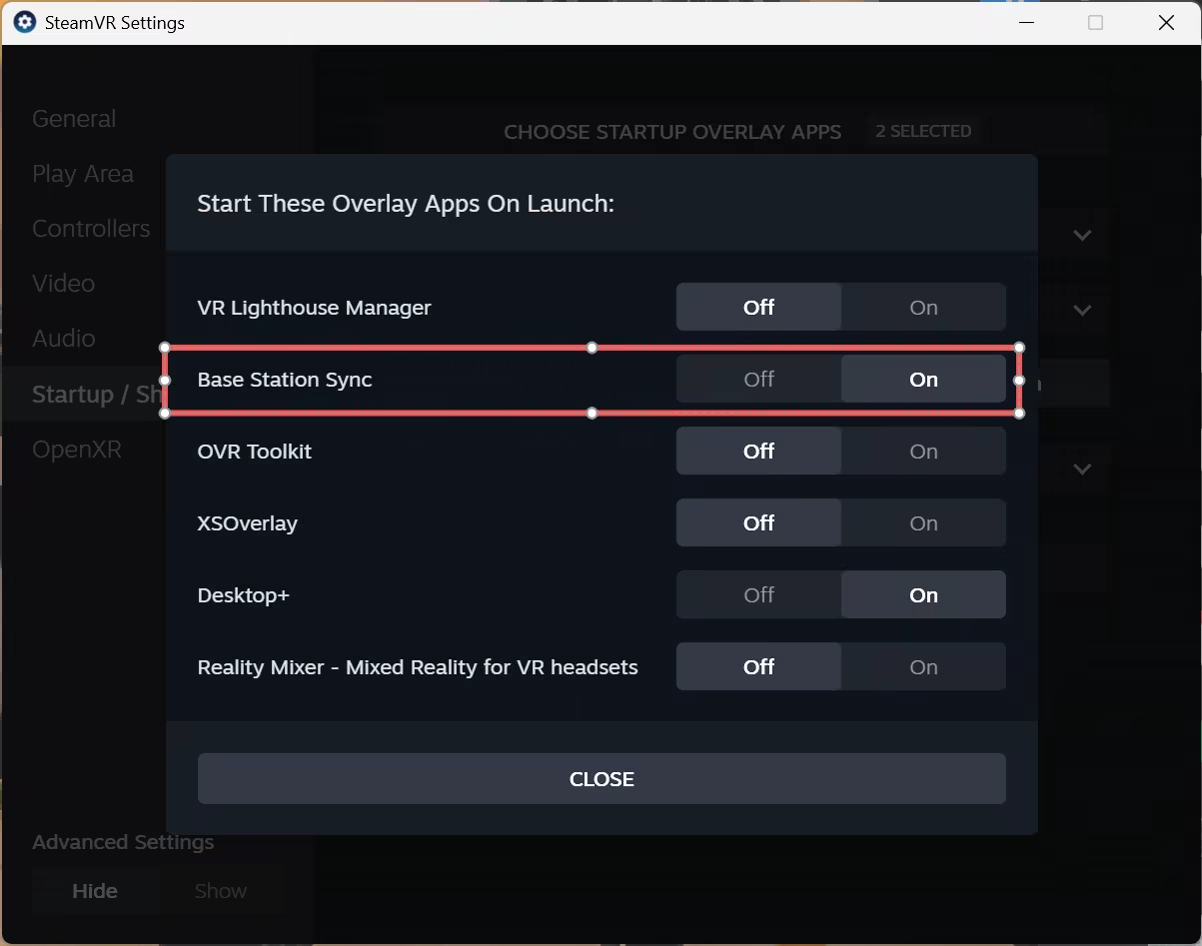
Open the SteamVR settings menu and navigate to the "Startup / Shutdown" tab.
Click "Choose Startup Overlay Apps" and toggle Base Station Sync to ON.
All Done! From now on, it will act as an invisible guardian, fully following SteamVR's launch and closure to automatically sync your base stations.
💡 Technical Notes
Regarding Temporary Mouse Disturbance: Due to high-load Bluetooth communication, the software might very briefly affect wireless mouse tracking at the exact split-second the base stations are powering on or off (causing a 1-2 second slight movement delay). The mouse will automatically return to normal within seconds; this is a normal physical phenomenon, so please do not worry.
Regarding Sleep Delay: After SteamVR closes, it takes approximately 60 seconds of waiting and buffering for the base stations to enter full sleep mode and for the motors to completely stop spinning. No extra operations are needed during this period.
"Partagez votre expérience de jeu"
Help other gamers! Share how this game runs on your setup, share tips, or ask questions.
Please log in to share your experience with the community!
Jeux les mieux notés
Discover similar games you might enjoy based on genre and creator.





Avis Légal
Les informations sur le jeu, les images, les descriptions et la configuration système requise affichées sur cette page proviennent de plateformes tierces et n'appartiennent pas à Can I Run It. Nous ne sommes ni affiliés, ni approuvés, ni liés aux développeurs, éditeurs ou distributeurs du jeu.
Can I Run It est un service de vérification de compatibilité système qui aide les utilisateurs à déterminer si leur matériel peut exécuter des jeux spécifiques. Nous ne vendons, ne distribuons et n'hébergeons aucun contenu de jeu.
Toutes les marques commerciales, marques déposées, noms de produits et noms de sociétés ou logos mentionnés ici sont la propriété de leurs propriétaires respectifs.
Si vous pensez qu'un contenu affiché viole vos droits de propriété intellectuelle, veuillez nous contacter à [email protected] avec les détails pertinents, et nous répondrons rapidement à vos préoccupations.