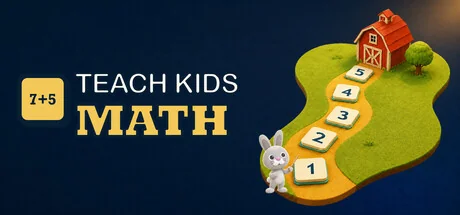
Teach Kids Math
2kblater
It is time to teach kids math. Help your child build confidence in math with visual problems, learning paths, and step-by-step explanations. Let them practice at their own pace, revisit saved answers together, and watch Tallygrove Farm grow with each correct answer.
Requisitos del sistema
Requisitos mínimos
Requisitos recomendados
Acerca de este juego
Teach Kids Math brings together visual exercises for primary-school Grades 1 and 2, step-by-step explanations, and a farm that grows as children learn. Follow a learning path or choose what to practice together.
The learning library in numbers
- 2 learning paths - 179 math concepts for Grade 1 and 157 for Grade 2.
- 50 tests - curriculum practice, problems inspired by math competitions, and mixed exercises, arranged by grade and stage of the school year.
- 704 problem types - counting, understanding numbers, arithmetic, measurement, geometry, logic, and more.
- 6,299 prepared problem variants - practice the same skill with different numbers, pictures, answer choices, and situations.
- Explanations of 246 math concepts and a dictionary with 218 entries.
Follow the curriculum through the school year
Choose the Grade 1 path with 179 concepts or the Grade 2 path with 157. Activities are arranged across your local school-year calendar. See the topics already covered and those coming next, then generate a new practice test from your child's current stage.
Alongside curriculum practice, you can choose tests with problems inspired by math competitions and other selected exercises. The grade and school-year stage help you find a suitable starting point.
Take complete tests or practice one skill
Work through one of the 50 tests, create your own, or focus on one of 704 problem types. Practice counting, comparing, patterns, addition, subtraction, measurement, geometry, and logic with pictures and written questions.
The 6,299 prepared problem variants give children different ways to practice the same skill. A variant is marked as mastered in the app after 3 correct answers. Later mistakes do not remove that saved status.

Review the work, not just the score
Reopen any saved worksheet to see finished and unfinished exercises, your child's answers, and the correct answers. Step-by-step explanations help you follow the reasoning together.
Use statistics to decide what comes next
See which saved activities are complete and which are still in progress. View the percentage of correct answers when enough answer records are available, activity over the last 28 days, and progress by grade and stage of the school year. Open a recent completed test to review its answers and explanations.
Grow your farm as you practice math
Each correct answer earns 1 Farm point. Completing a test with every answer correct adds 10 more. Every 50 Farm points completes a crop cycle with 4 stages: preparing the ground, growing, harvesting, and storing. Each completed cycle adds another harvest to the granary. The farm journal shows the current stage, progress through the cycle, stored harvests, and points needed for the next harvest.
Long-term progress also builds the homestead piece by piece, adding paths, fields, buildings, trees, crops, animals, and new residents to Tallygrove Farm.
Choose how to practice
- Follow the Grade 1 or Grade 2 learning path.
- Browse curated tests by grade and stage of the school year.
- Create a custom test or practice one problem type.
- Reopen saved work and inspect step-by-step explanations.
- Use learning statistics to choose what to revisit.
- Explore math concepts and vocabulary.
- Print a worksheet when pencil and paper are the better fit.
Follow a learning path. Try different problems. Understand the answers. Grow your farm.
Comparte Tu Experiencia de Juego
Help other gamers! Share how this game runs on your setup, share tips, or ask questions.
Please log in to share your experience with the community!
Juegos mejor valorados
Discover similar games you might enjoy based on genre and creator.


Aviso legal
La información del juego, las imágenes, las descripciones y los requisitos del sistema que se muestran en esta página provienen de plataformas de terceros y no son propiedad de Can I Run It. No estamos afiliados, respaldados ni conectados con los desarrolladores, editores o distribuidores del juego.
Can I Run It es un servicio de verificación de compatibilidad del sistema que ayuda a los usuarios a determinar si su hardware puede ejecutar juegos específicos. No vendemos, distribuimos ni alojamos ningún contenido de juegos.
Todas las marcas comerciales, marcas registradas, nombres de productos y nombres o logotipos de empresas que se mencionan en este documento son propiedad de sus respectivos dueños.
Si cree que algún contenido mostrado infringe sus derechos de propiedad intelectual, póngase en contacto con nosotros en [email protected] con detalles relevantes y atenderemos sus inquietudes con prontitud.