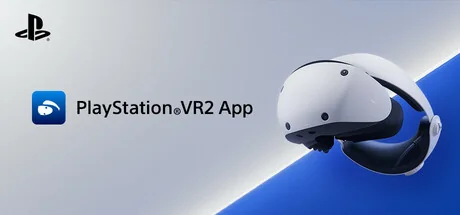
PlayStation®VR2 App
Sony Interactive Entertainment
Enjoy VR games and apps on Steam with PlayStation VR2! Install PS VR2 App to use PS VR2 on your PC, set up your PS VR devices, and keep the firmware for PS VR2 headset and PS VR2 Sense controllers up to date.
Requisitos del sistema
Requisitos mínimos
Requisitos recomendados
Acerca de este juego
- Play VR games and apps on Steam using your PlayStation VR2 VR headset and PlayStation VR2 Sense controllers.
- Set up your PlayStation VR2 on your PC.
- Update the firmware for your PlayStation VR2 VR headset and PlayStation VR2 Sense controllers.
- Adjust settings for your PlayStation VR2 from the SteamVR dashboard, including setting your play area and screen brightness.
You'll need the following to get started with PlayStation VR2 App:
- PlayStation VR2 VR headset
- PlayStation VR2 Sense controllers
- PlayStation VR2 PC adapter
- DisplayPort™1.4 cable (sold separately)
- Bluetooth® adapter (sold separately, required only if your PC doesn't support Bluetooth®)
For details about the required specs for PC, visit the PlayStation VR2 support page, or refer to the "System Requirements" section below.
Using this app
When connecting PlayStation VR2 Sense controllers to a PC, connection or tracking problems may occur depending on the condition of the Bluetooth devices being used or the surrounding environment. In such cases, refer to the PlayStation Support page titled "Bluetooth adapters compatible with PS VR2 on PC" for more information.
To play VR games and apps on Steam with PlayStation VR2, PlayStation VR2 App needs to be installed on your PC. Keep the app installed even after initial setup is complete.
Comparte Tu Experiencia de Juego
Help other gamers! Share how this game runs on your setup, share tips, or ask questions.
Please log in to share your experience with the community!
Juegos mejor valorados
Discover similar games you might enjoy based on genre and creator.

Aviso legal
La información del juego, las imágenes, las descripciones y los requisitos del sistema que se muestran en esta página provienen de plataformas de terceros y no son propiedad de Can I Run It. No estamos afiliados, respaldados ni conectados con los desarrolladores, editores o distribuidores del juego.
Can I Run It es un servicio de verificación de compatibilidad del sistema que ayuda a los usuarios a determinar si su hardware puede ejecutar juegos específicos. No vendemos, distribuimos ni alojamos ningún contenido de juegos.
Todas las marcas comerciales, marcas registradas, nombres de productos y nombres o logotipos de empresas que se mencionan en este documento son propiedad de sus respectivos dueños.
Si cree que algún contenido mostrado infringe sus derechos de propiedad intelectual, póngase en contacto con nosotros en [email protected] con detalles relevantes y atenderemos sus inquietudes con prontitud.