TimoS
Dapper Digital Oy
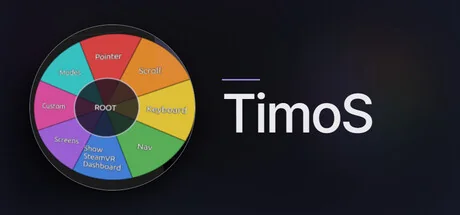
SteamOS coming soon! Operate your Windows PC in VR with only your head. Built for people who can't use controllers, but useful to those who can! Go hands free in more casual experiences. Gaze-and-dwell cursor, radial menu, on-screen keyboard, for the SteamVR dashboard and your Windows desktop.
Systemanforderungen
Mindestanforderungen
Empfohlene Anforderungen
Über dieses Spiel
SteamOS Build Coming Soon!!!
My goal was to always build TimoS for the Steam Frame from the start. They delayed it and delayed it again. My Steam Frame will arrive soon, and I will promptly begin work on a native build with Arch-friendly functionality.
Your head is the controller
TimoS lets someone who can move only their head operate a VR headset, the SteamVR dashboard, and the Windows desktop behind it. No hand controllers, no buttons, no touch. It was built for Timo who needed exactly that.
The one idea: look and hold
Wherever you look, the cursor follows. Hold your gaze on a target for about half a second (customizable), and it activates. Glance away and nothing fires, so looking around never clicks by accident. Every feature in TimoS works this way.
What's in the box today
Place-then-Click targeting - lock a green target onto the exact spot you want, then fire the click steadily. If you don't quite place it where you want, you can nudge the cursor into place.
The full mouse - left, right, middle, double-click, drag & drop, and scrolling, on the Windows desktop view. In SteamVR a left click doubles as a trigger pulse to interact with the SteamVR UI.
A radial menu that's always within reach - anchored where you want, recoverable by a head pose.
Full on-screen keyboard - complete with F-keys, numpad, US English layout.
Spoken feedback (optional) - a narrator confirms actions out loud; on-screen captions show what the voice said.
Who this is for
People who benefit most: those with spinal cord injuries, ALS/MND, muscular dystrophy, cerebral palsy, limb difference... anyone whose head is their most reliable pointer.
What you need
A Windows PC with SteamVR and a headset that can use SteamVR (developed and tested on the Valve Index). Also tested with Quest 2 and Quest 3. No controllers required.
Support that cares
If you know something that can improve the way TimoS works. Talk to me! I'm ready for any and all feedback that comes my way. It's my goal to make the emerging technologies include everyone. Starting with VR via SteamVR.
Teile dein Spielerlebnis
Help other gamers! Share how this game runs on your setup, share tips, or ask questions.
Bestbewertete Spiele
Discover similar games you might enjoy based on genre and creator.




Haftungsausschluss
Die Spielinformationen, Bilder, Beschreibungen und Systemanforderungen, die auf dieser Seite angezeigt werden, stammen von Drittanbieterplattformen und sind nicht Eigentum von Can I Run It. Wir sind nicht mit den Spieleentwicklern, Publishern oder Distributoren verbunden, werden von ihnen nicht unterstützt und stehen in keiner Verbindung zu ihnen.
Can I Run It ist ein Systemkompatibilitäts-Prüfdienst, der Nutzern hilft festzustellen, ob ihre Hardware bestimmte Spiele ausführen kann. Wir verkaufen, vertreiben oder hosten keine Spielinhalte.
Alle hier erwähnten Marken, eingetragenen Marken, Produktnamen und Firmennamen oder Logos sind Eigentum ihrer jeweiligen Inhaber.
Wenn Sie der Meinung sind, dass angezeigte Inhalte Ihre geistigen Eigentumsrechte verletzen, kontaktieren Sie uns bitte unter [email protected] mit relevanten Details, und wir werden uns umgehend um Ihre Anliegen kümmern.