Second Look — Screen Magnifier for Gaming and Low Vision
Avalon Software
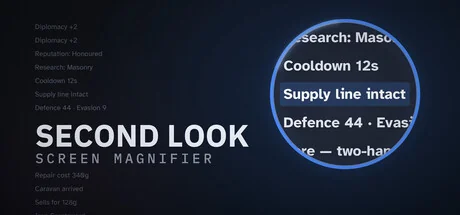
Second Look enlarges whatever you point at, sharp and right under your cursor, so quest text, item names and map labels stay readable in any game. Built for gaming and for eyes that struggle with small text, it stays light on your frame rate and even includes a crosshair with 200 designs.
Systemanforderungen
Mindestanforderungen
Empfohlene Anforderungen
Über dieses Spiel
Small text shouldn't end a hobby
Quest logs at 4K. Item names crammed into an inventory grid. The unit tooltip in a strategy game that assumes you're twenty-five and sitting eighteen inches from the screen. If you've caught yourself leaning in, squinting, or quietly giving up on games you used to love, Second Look is built for you.
Press a hotkey and point. Whatever is under your cursor enlarges in place, sharply, and follows as you move. Read it, and let go. There's no launcher to set up, no game to modify, and nothing to change inside whatever you're playing. It works over the top of what's already on screen.
Before you buy: competitive multiplayer games with kernel-level anti-cheat block screen magnifiers. The full list is under Compatibility below. Please read it first.
What it does
Follow-cursor magnification. The magnified region tracks your mouse, so you read by pointing instead of hunting a box around the screen. This is the feature the whole product is built around.
Fixed-region and screen-center modes for when you'd rather it stayed put. The region is movable, so it never gets stuck over your minimap.
Sharp, not blocky. Magnification uses AMD FidelityFX Super Resolution 1.0 edge-adaptive upscaling, with optional light sharpening and a text-sharpening pass aimed at small interface lettering. Three quality tiers, Fast, Balanced and Sharp, and every one is usable.
A dark-scene lift. Magnifying a dark corridor usually turns crushed blacks to mud. A gamma, brightness and contrast lift applies inside the lens only, and can run at 1x if you just want a dim game readable.
Colour filters for tired or colour-blind eyes, applied inside the lens.
A built-in crosshair. Pick from 200 included designs, recolour it to any colour, scale it to any size, and sit it at the center of the screen or have it follow your pointer. Saved per profile like everything else. Off by default, visible in recordings, and covered by the same anti-cheat caution as the magnifier.
Hotkeys that actually bind. A bare left Shift, side mouse buttons 4 and 5, left and right modifiers told apart, hold or toggle per binding, and controller support through generic HID so third-party pads aren't left out.
Named profiles, kept per game. Zoom, region, shape and keys, saved to disk the moment you change them, so a crash never costs you your setup.
More than one monitor, handled properly. Magnify whichever display the pointer is on, with the lens following it across screens mid-zoom, or pin it to one display and it stays there. Plugging a monitor in or pulling one out is handled while it runs.
Up to 5x magnification. That's enough to read a quest log or an item name comfortably.
Nothing running when you're not using it. With zoom off there's no capture session, no frame pool, no timer and no polling loop. Close the window and it exits. It doesn't sit in your tray, and it doesn't start with your PC, unless you ask it to.
What your screenshots and clips show
On both Windows and SteamOS, the lens itself is held out of screenshots and screen recordings, for an honest technical reason: it sits on your pointer, and so does the slice of screen it's reading. There's no way to let it record without it also filming itself, and a lens that films itself magnifies its own image over and over until the picture is unusable within seconds. Holding it out of the recording is the only way a lens that follows your pointer can magnify everything under it. Everything else is as it should be: it isn't hidden from Task Manager, it doesn't touch the game, and it closes when you close it.
Compatibility: read this before you buy
Competitive multiplayer games with kernel-level anti-cheat block screen magnifiers.
Second Look reads the screen through standard operating-system APIs. It does not hook, inject into, or read the memory of any game. Even so, kernel-level anti-cheat detects the technique, not the application, and several systems will kick or ban you for running any magnifier at all. We don't support or recommend using it in the games below, and we can't help if you're banned for doing so:
Rust (Easy Anti-Cheat)
Valorant (Riot Vanguard)
Counter-Strike 2 (VAC)
Fortnite (Easy Anti-Cheat)
Rainbow Six Siege (BattlEye)
Marvel Rivals (NetEase Anti-Cheat)
FiveM (GTA V multiplayer) (FiveM Anti-Cheat)
This list isn't exhaustive, and anti-cheat systems change without notice. If a game you play uses kernel-level anti-cheat, assume a magnifier isn't safe to run with it. The app shows you this same list the first time you launch it.
Where it shines
4X and grand strategy: dense interface text and tiny map labels are exactly the problem this solves. Civilization VI and VII, Crusader Kings III, Stellaris, Europa Universalis IV, Old World, Total War: Warhammer III.
Single-player RPGs: quest logs, item tooltips, inventory screens. Baldur's Gate 3, Cyberpunk 2077, The Witcher 3, Divinity: Original Sin 2, Disco Elysium, Pillars of Eternity II.
Simulation and management: Cities: Skylines II, Factorio, RimWorld, Football Manager, Microsoft Flight Simulator, X4: Foundations, Anno 1800.
Co-op and single-player shooters without kernel anti-cheat: Deep Rock Galactic, Satisfactory, Valheim.
Anything on a 4K display whose interface doesn't scale: by now, that's most things.
Performance
The goal is simple: cost you nothing when it's off, and next to nothing when it's on. Captured frames never leave the GPU, with no copy to system memory and no read back, and when zoom is off there is genuinely nothing running: no capture session, no timer, no background thread. In our own testing, holding the lens up through a demanding scene showed no measurable frame-rate cost. We'd rather tell you that plainly than quote a number we can't stand behind on your hardware.
Built to keep working
Alt-tabbing, a resolution change, plugging in a monitor, a graphics-driver reset: these are the moments screen overlays traditionally fall over. Second Look treats them as normal life. Capture re-acquires and carries on rather than freezing, the lens follows you to the window or display you actually switched to, and because every setting is written to disk the instant you change it, even a crash can't cost you your setup. If something on your system genuinely can't be worked with, it says so on screen, in plain words.
Steam Deck and SteamOS
A 1280x800 handheld is one of the strongest cases there is for a magnifier. In Desktop Mode this works fully: hotkey, follow-cursor magnification, all three quality tiers, the lens drawn over whatever you're running. In Game Mode it is not available: Game Mode replaces the desktop compositor with gamescope, which doesn't expose the overlay and capture interfaces this is built on. Rather than fail silently, the app detects Game Mode and tells you on screen. We'd rather you knew that before buying than after, and if Game Mode support becomes possible, we'll add it and say so.
What it isn't
No mouse-sensitivity scaling while zoomed.
No game hooking, injection or memory access; capture only, through documented OS APIs.
No hidden process, no required launch flags, no "compatibility mode".
No background idling; no auto start unless you switch it on.
No telemetry, no analytics, no network connections of any kind.
No advertisements, no pop-ups, no subscription, no in-app purchases, and no companion apps to buy. The price on this page is the entire product.
No Steam DRM wrapper. The executable runs standalone, and if Steam isn't running the app still works.
Teile dein Spielerlebnis
Help other gamers! Share how this game runs on your setup, share tips, or ask questions.
Bestbewertete Spiele
Discover similar games you might enjoy based on genre and creator.

Haftungsausschluss
Die Spielinformationen, Bilder, Beschreibungen und Systemanforderungen, die auf dieser Seite angezeigt werden, stammen von Drittanbieterplattformen und sind nicht Eigentum von Can I Run It. Wir sind nicht mit den Spieleentwicklern, Publishern oder Distributoren verbunden, werden von ihnen nicht unterstützt und stehen in keiner Verbindung zu ihnen.
Can I Run It ist ein Systemkompatibilitäts-Prüfdienst, der Nutzern hilft festzustellen, ob ihre Hardware bestimmte Spiele ausführen kann. Wir verkaufen, vertreiben oder hosten keine Spielinhalte.
Alle hier erwähnten Marken, eingetragenen Marken, Produktnamen und Firmennamen oder Logos sind Eigentum ihrer jeweiligen Inhaber.
Wenn Sie der Meinung sind, dass angezeigte Inhalte Ihre geistigen Eigentumsrechte verletzen, kontaktieren Sie uns bitte unter [email protected] mit relevanten Details, und wir werden uns umgehend um Ihre Anliegen kümmern.