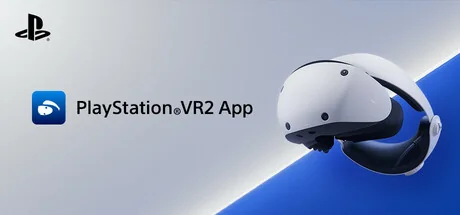
PlayStation®VR2 App
Sony Interactive Entertainment
Enjoy VR games and apps on Steam with PlayStation VR2! Install PS VR2 App to use PS VR2 on your PC, set up your PS VR devices, and keep the firmware for PS VR2 headset and PS VR2 Sense controllers up to date.
Systemanforderungen
Mindestanforderungen
Empfohlene Anforderungen
Über dieses Spiel
- Play VR games and apps on Steam using your PlayStation VR2 VR headset and PlayStation VR2 Sense controllers.
- Set up your PlayStation VR2 on your PC.
- Update the firmware for your PlayStation VR2 VR headset and PlayStation VR2 Sense controllers.
- Adjust settings for your PlayStation VR2 from the SteamVR dashboard, including setting your play area and screen brightness.
You'll need the following to get started with PlayStation VR2 App:
- PlayStation VR2 VR headset
- PlayStation VR2 Sense controllers
- PlayStation VR2 PC adapter
- DisplayPort™1.4 cable (sold separately)
- Bluetooth® adapter (sold separately, required only if your PC doesn't support Bluetooth®)
For details about the required specs for PC, visit the PlayStation VR2 support page, or refer to the "System Requirements" section below.
Using this app
When connecting PlayStation VR2 Sense controllers to a PC, connection or tracking problems may occur depending on the condition of the Bluetooth devices being used or the surrounding environment. In such cases, refer to the PlayStation Support page titled "Bluetooth adapters compatible with PS VR2 on PC" for more information.
To play VR games and apps on Steam with PlayStation VR2, PlayStation VR2 App needs to be installed on your PC. Keep the app installed even after initial setup is complete.
Teile dein Spielerlebnis
Help other gamers! Share how this game runs on your setup, share tips, or ask questions.
Bestbewertete Spiele
Discover similar games you might enjoy based on genre and creator.

Haftungsausschluss
Die Spielinformationen, Bilder, Beschreibungen und Systemanforderungen, die auf dieser Seite angezeigt werden, stammen von Drittanbieterplattformen und sind nicht Eigentum von Can I Run It. Wir sind nicht mit den Spieleentwicklern, Publishern oder Distributoren verbunden, werden von ihnen nicht unterstützt und stehen in keiner Verbindung zu ihnen.
Can I Run It ist ein Systemkompatibilitäts-Prüfdienst, der Nutzern hilft festzustellen, ob ihre Hardware bestimmte Spiele ausführen kann. Wir verkaufen, vertreiben oder hosten keine Spielinhalte.
Alle hier erwähnten Marken, eingetragenen Marken, Produktnamen und Firmennamen oder Logos sind Eigentum ihrer jeweiligen Inhaber.
Wenn Sie der Meinung sind, dass angezeigte Inhalte Ihre geistigen Eigentumsrechte verletzen, kontaktieren Sie uns bitte unter [email protected] mit relevanten Details, und wir werden uns umgehend um Ihre Anliegen kümmern.