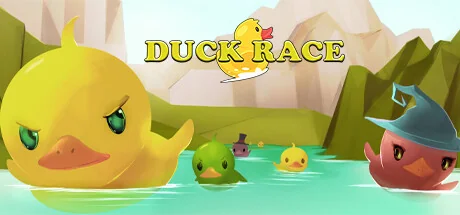
Duck Race
Ibzy Studios
Duck Race is a cute Twitch integrated racing game. Players can join the race with the chat command !quack and customise their rubber duck with a variety of hats and accessories.
Systemanforderungen
Mindestanforderungen
Empfohlene Anforderungen
Über dieses Spiel
IMPORTANT: A live Twitch stream is required to play Duck Race.
Duck Race is the latest in Twitch viewer interaction!
Invite your viewers to enter the race as an adorable rubber duck, and kit them out with a variety of skins and accessories. Let them loose across a number of rivers and environments, and cheer as they race to be the first over the waterfall!
Key Features
- Full Twitch.tv chat integration
- !quack to join the race
- Customise with a number of skins to choose from
- Add additional flare with over 25 hats and accessories
- Custom Duck names - escape the restrictions of username326
Early Response
"“Duck Race is super-cute. My viewers love their tiny rubber ducks in funny hats, and I love how fun they look when they go over a waterfall.” - John Robertson + The Dark Room)
"Duckrace is one of the best and easiest community, chill games out there.
Rubber duck racing?
HECK YEAH" - MEOwTiNgZ
"Let's just say Duck Race moved me... TO A BIGGER HOUSE!
(Oops, I said the quiet part loud and the loud part quiet.)
No but seriously, Duck Race is super fun and really easy to explain to new viewers, instant conversational starter." - THRILLHOO
Controls
Mostly intuitive controls, but with a little nuance:
- Click ducks on the home screen to set player skin options
- Click left mouse to take/release control of the camera
- Mouse to turn camera
- WASD to move camera - Shift speeds you up
- Numbers 1-9 for set camera locations
- Space to move UP, Left Ctrl to move DOWN
- M to mute music
- +/- to increase/decrease camera movement speed
- Q to show/hide names
Teile dein Spielerlebnis
Help other gamers! Share how this game runs on your setup, share tips, or ask questions.
Bestbewertete Spiele
Discover similar games you might enjoy based on genre and creator.


Haftungsausschluss
Die Spielinformationen, Bilder, Beschreibungen und Systemanforderungen, die auf dieser Seite angezeigt werden, stammen von Drittanbieterplattformen und sind nicht Eigentum von Can I Run It. Wir sind nicht mit den Spieleentwicklern, Publishern oder Distributoren verbunden, werden von ihnen nicht unterstützt und stehen in keiner Verbindung zu ihnen.
Can I Run It ist ein Systemkompatibilitäts-Prüfdienst, der Nutzern hilft festzustellen, ob ihre Hardware bestimmte Spiele ausführen kann. Wir verkaufen, vertreiben oder hosten keine Spielinhalte.
Alle hier erwähnten Marken, eingetragenen Marken, Produktnamen und Firmennamen oder Logos sind Eigentum ihrer jeweiligen Inhaber.
Wenn Sie der Meinung sind, dass angezeigte Inhalte Ihre geistigen Eigentumsrechte verletzen, kontaktieren Sie uns bitte unter [email protected] mit relevanten Details, und wir werden uns umgehend um Ihre Anliegen kümmern.